

Boat Flooring Product Photography Guide for Marine Distributors
Boat flooring product photography is not only a marketing task. For marine distributors, it is a sales-control tool. The right photo set helps dealers understand texture, color, seam style, surface direction, kit context, and the limits of what a picture can prove before they quote, sample, or recommend a product to a boat owner.
Poor photos create the opposite effect. A close-up with no scale can make every pattern look the same. A beauty shot with no label can disconnect the image from the SKU. A lifestyle scene can help a catalog page, but it should not be treated as proof of performance, certification, or a completed customer installation.
This guide gives marine distributors a practical workflow for planning boat flooring product photos for catalogs, dealer sheets, online listings, and quote packets. It pairs naturally with the XYF Marine guide to marine deck dealer display kits, because photos and physical samples should support the same buying conversation.
Start With the Selling Question
Before taking photos, define what the buyer needs to decide. A repair yard may need to compare texture and backing notes. A retailer may need images that explain color options to walk-in customers. A distributor sales team may need a quote packet that connects a product photo, SKU, deck zone, and sample code.
Do not brief the photographer with only "take nice product shots." Brief the sales question. If the question is color comparison, the image set should include controlled lighting, a neutral background, and consistent angle. If the question is fit context, the image needs a visible deck zone or application view. If the question is texture, the photo should show surface direction and detail without exaggerating the material.
This early decision keeps the image set from becoming a random folder of attractive but hard-to-use files.
Build a Minimum Photo Set
A distributor does not need a studio for every SKU, but each important boat flooring product should have a disciplined minimum photo set. Start with a clean product overview, a surface-detail image, a scale or edge-context image, and one application-context image when an authorized scene is available.
The overview photo shows the pattern, color family, and general look. The surface-detail photo helps buyers understand texture, groove direction, and seam contrast. The scale or edge image helps dealers explain thickness perception, panel boundary, or kit edge behavior without inventing a specification. The application-context image shows where the flooring may be used, but it should be described as illustrative unless the project is documented and approved for use as a case image.
For many distributors, this simple four-part set is more useful than ten dramatic images that cannot be tied back to a product record.
Photograph Texture Without Overpromising Performance
Texture photos are valuable because marine buyers often care about how a deck feels underfoot, how grooves guide water visually, and how the surface will look after installation. However, a texture photo is still a visual asset. It cannot prove slip resistance, UV resistance, adhesive performance, or long-term durability by itself.
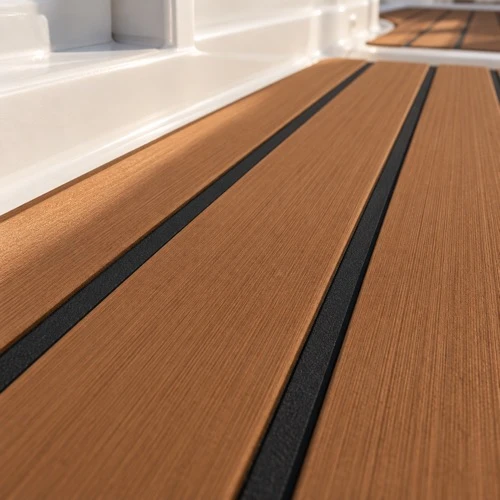
Use close-ups to show what is visibly present: raised or brushed texture, groove direction, color contrast, seam spacing, and edge shape. Avoid captions that turn the image into a claim the image cannot support. A safe caption might say, "close-up of teak-look boat flooring with black seam lines." An unsafe caption would claim certified slip performance unless a current test report supports that statement.
The XYF Marine article on marine deck color and texture selection can support the buyer conversation around appearance tradeoffs. Product photos should make those tradeoffs easier to see, not replace the written specification.
Keep SKU and Photo Naming Connected
A photo folder becomes risky when files are named only by date, camera number, or a vague phrase like "gray deck new." Marine distributors should connect image names to the same product identifiers used in catalogs, warehouse records, and dealer communications.
At minimum, the file name or metadata should identify the product family, color, pattern or surface style, view type, and revision when applicable. If the distributor already uses a SKU structure, the photo should follow it. This prevents a dealer from placing the wrong image beside the wrong ordering code.
For teams still cleaning up their naming system, the XYF Marine boat flooring SKU naming guide is a useful companion. Photo discipline and SKU discipline should move together.
Show Color With Controlled Expectations
Color is one of the easiest areas to mishandle. A photo taken under warm indoor light, direct sun, or a heavily edited filter may look appealing but mislead the buyer. Distributors should keep at least one neutral reference photo for every product color and avoid using dramatic lighting as the only image.
When possible, use the same background, angle, and lighting style across related products. This lets dealers compare colors more fairly. If photos are AI-generated, rendered, edited, or used as illustrative scenes, record that internally and avoid presenting them as documentary proof of real inventory, factory output, or a customer project.
Buyers still need physical samples or confirmed material records for final color approval. Product photography can narrow the conversation, but it should not pretend to replace sample review where color accuracy matters.
Capture Application Context Carefully
Application photos help dealers explain where a product may fit: cockpit areas, steps, hatches, pontoons, tenders, center consoles, workboat decks, or retail display boards. The goal is to help the buyer imagine use cases and ask better questions.
The risk is overclaiming. A scene can show a visual application, but it should not imply that the shown boat, installation, or project belongs to the distributor unless that is true and documented. If the image is generated or staged, treat it as illustrative. If it is a real customer installation, make sure usage permission and claim boundaries are clear before the photo enters a catalog or sales deck.
Application context works best when paired with written notes: intended zone, visible pattern, color family, whether the image is illustrative, and which specification details still need confirmation before ordering.
Add Photos to Quote Packets Without Replacing Specs
A quote packet can include photos, but photos should support the written offer rather than replace it. A distributor should still identify the product, color, pattern, backing assumption, quantity basis, packaging expectation, and any open questions that affect the quote.
Images are useful in a quote packet when they reduce ambiguity. A surface close-up can confirm the visual pattern being discussed. A deck-zone image can show the intended application. A labeled overview can help the buyer match the photo to the SKU. But the quote should not rely on the photo alone for commercial or technical terms.
For trader and buying-agent workflows, the XYF Marine boat flooring quote comparison guide explains why written assumptions matter. Product photos can make the comparison clearer, but they cannot carry the full purchasing decision.
Use Incoming Stock Photos as Receiving Records
Distributors can also use product photos after goods arrive. Incoming-stock photos are not the same as catalog photos. They should document visible carton condition, label condition, product identification, visible surface condition, and any exceptions that need review before stock is released.
This is especially useful when stock will be split between dealers, repair yards, or internal cut-to-size programs. A quick receiving photo set can help the team trace which batch or shipment supplied a later sample, display kit, or customer order.
If the receiving check raises concerns, connect the photo record to a formal inspection workflow. The XYF Marine marine deck receiving inspection guide for distributors can help teams decide what to record before releasing stock.
Prepare Images for Dealer Use
Dealer-ready photos should be easy to use without creating new risk. Provide a small set of approved images with clear file names, simple captions, and usage notes. If a dealer should not crop out a label, alter a color, or present an illustrative image as a real installation, say so in the image packet.
Also prepare web-friendly versions and print-friendly versions separately. A huge print image may slow an online product page. A compressed web image may look weak in a catalog sheet. Keep the master file, but give dealers the correct export for the channel they are using.
This is where a distributor can quietly improve sales quality. Dealers are more likely to use correct images when the approved folder is easier than making their own screenshots, phone photos, or untracked edits.
Product Photography Checklist for Distributors
Use this checklist before adding boat flooring photos to a catalog, dealer sheet, listing, or quote packet:
- Define the buyer question the image set must answer before taking photos.
- Capture a product overview, surface detail, scale or edge context, and application-context view when appropriate.
- Name files with product family, pattern, color, view type, and revision where relevant.
- Use controlled lighting for color comparison and avoid relying only on dramatic scenes.
- Label illustrative, rendered, or generated images internally so they are not treated as documentary proof.
- Keep captions limited to what is visibly present unless the claim has separate evidence.
- Pair quote-packet photos with written product, quantity, backing, packaging, and open-question notes.
- Create dealer-ready exports with clear usage notes and channel-appropriate file sizes.
The checklist should be adjusted to the distributor's product range and sales channels. A simple stock assortment may need fewer images than a custom flooring program, but every image should still be traceable to the product it represents.
FAQ
Should distributors use AI-generated boat flooring images?
AI-generated or rendered images can be useful as illustrative sales assets when they are relevant and clearly controlled internally. They should not be presented as proof of factory production, certification, QC testing, real inventory, customer installation, or completed OEM work.
What is the most important photo for a boat flooring listing?
The most important photo depends on the buyer question. For color comparison, use a neutral overview. For texture questions, use a close surface detail. For quote clarification, use a labeled product or application image that matches the written SKU and assumptions.
Can product photos replace physical samples?
No. Photos can help buyers narrow options and prepare better questions, but final color, texture, backing, and application decisions may still require samples, drawings, written specifications, or supplier confirmation.
Work With XYF Marine on Distributor Photo Packets
When discussing boat flooring product photography with XYF Marine, send the product family, color or pattern names, intended sales channel, dealer use case, and any quote or catalog fields the images must support. Clear photo requirements help turn product images into practical distributor assets instead of loose marketing files.